Obsidian Love Story: Hierarchical Outgoing Links Plugin
I’ve made no secret of my love for Obsidian, the free-form, loosely-organized, markdown-based notetaking tool. I use it for everything. I use it to organize work, I use it for drafting blog posts, and I use it when I need to get something out of my head.
One of the super-powers of Obsidian and the Zettlekasten notetaking philosophy is the concept of writing stuff down now and organizing it later. Obsidian provides many different views to explore and navigate between notes. I’m going to focus on the core functionality of Outgoing Links.
Outgoing Links
Outgoing links display references “outgoing” from the current note to other notes. In the example below the outgoing links are displayed on the right-hand side. The links are helpful to identify other topics associated with the active note. In this example you see people, projects, and teams referenced. The core plugin displays all the links and the file path underneath the link name. It also co-mingles resolved links (those links with files associcated) with unresolved links(links with no file associated).
This view is helpful to see what the active note references but it’s hard to tell who are all the people associted with the note or which projects are referenced.

Frontmatter, Tags, and File Structure - So Many Ways to Organize!
Obsidian relies less on file folder structure for organization and more on less structured methods like frontmatter data and tags.
Frontmatter is metadata added to the top of a file which can help describe any ancillary information about a note like dates or note type. I’ve used frontmatter in the past in combination with the Projects plugin to organize all my team’s in-flight initiatives.
Example:
---
full_name: 2023 APIs
owners: Dave
priority: 90
status: completed
tags:
- project/2023
---
Tags are the loosest method of organization. A tag is simply #tagname on a line in a file. You can add a bit of structure to tags by following a #level1/level2/tag naming scheme if you like.
Both of these methods didn’t scale for me. I keep A LOT of notes. To maintain some level of sanity with the amount of files I create I organize them into file-based structure to keep the most basic things separate. I organize my notes into people, projects, teams, and processes folders. Trying to accomplish the same structure using Frontmatter would mean using another plugin like Dataview to query my notes. Using tags wouldn’t allow me to click-through directly to the referenced note.
A Better Outgoing Links View
What I really wanted was to view my outgoing links for the active note which mimicked the file-based organization I set up. I wanted to see all the links I had made to people for a given note. I wanted to see all the projects we had discussed during a meeting. Since each of these notes have their own detail I wanted the ability to click and navigate to those references. I couldn’t find any existing Obsidian plugin to solve my problem so I decided to build something myself.
Introducing: Hierarchical Outgoing Links
Let’s start with the example:
The outgoing links on the right now mimick the structure in which the referenced note is stored. This allows me to see at a glance who is involved in the current note, what project is associated, etc…
As a bonus, the new plugin displays Unresolved Links. An unresolved link is a link that exists in the active note but does not have a file yet created. Why is this important? I create a link for every possible noun during a meeting, conversation, random thought.
For example, I’ll create the task:-[ ] Call [[jim]] about the [[snowflake]] bill
[[jim]] or [[snowflake]] may not yet exist. If they don’t exist, I’ll want to create them at some point. My new plugin prominantly lists those links that are dangling and help me identify gaps that I will fill in later.
Next Steps
I developed the plugin to the level that I’ve started using it daily. It’s not complex but I want to make sure there are no glaring bugs in it before releasing it to the general public. I’m working on getting it polished up so that it can be submitted for official inclusion into the the Obsidian plugin ecosystem.
04/13/2024 UPDATE
My plugin has been officially released and is available in the Obsidian Community Plugins directory! Search for “Hierarchical Outgoing Links” to install it and let me know what you think!
Rawk-it: An Introduction
(This is the first in a series about Rawk-it.com, my passion project about music trends)
For the Love of Music
Music is a passion of mine. I’m one of those people who is extremely moved by music. There’s nothing better than experiencing the expression of feeling through music. Whether it be my kids practicing an instrument in our house or an arena show in the city, I can’t get enough of it. I have always consumed as much music as possible.
As a kid I spent weekends in the music stores thumbing thru cassettes and CDs looking for something I hadn’t heard before. I was the music director at the my college radio station for a short stint. My job was to intake all the new CDs, catalog them, and provide them out to the DJs. I loved that job so much. It was a constant stream of free new music and I was introduced to so many new genres. The artists were fresh, new, and undiscovered. Finding a diamond in the rough was amazing. Don’t laugh - we spun Faith by Limp Bizkit 6 months before mainstream radio picked it up. I had already moved onto Ska by the time Fred Durst and Co. broke into the big leagues.
The downfall of Napster and the advent of iTunes led to easier access but at a cost. I appreciate a well-crafted album. There’s an art to creating a flow and energy across a dozen songs which creates the album’s identity and personality. In the early days of iTunes albums were still being pushed. The single song purchasing model hadn’t taken off yet. Most singles still needed to be purchased as a full album. More music was coming online and was easily available with a click of a button. I found myself buying everything I could get my hands on. At one point I had to actually start budgeting for my monthly iTunes spend because it was getting out of control.
Not everything I was buying was good, though. I grew increasingly frustrated that I was spending money on music that had a short shelf life. I wanted find a way to be on the precipice of new music. I wanted to know about an artist RIGHT BEFORE they took off. I wanted a way to replicate that same experience I had as a college radio DJ. I wanted to find those artists floating just under the mainstream.
I was early in my data engineering career, learning that the internet was filled with free data. New tools and technologies were coming online that made acquiring and processing data easier. I figured if I could find a good source for new music then I could track up and coming songs and artists. This would give me that same “new music high” that I was chasing.
 Around the same time 89.3, The Current was finding it’s place in the Minnesota music scene. It has burst on the scene in the mid-2000s, saving Minnesota from corporate radio and shepherding in the rock revival led by The Strokes.
Origin Story: Inventing of Rawk-it.com
The Current was my inspiration. I figured if I could track the music they play then I could develop an algorithm that helped predict popularity.
I developed a data pipeline that cataloged The Current’s daily playlist and a simple Ruby application that charted song popularity. It became my “Music Radar”, before it existed in Spotify. I set up a simple website, published the results, and named it Rawk-it.com. The pipeline and chart refreshed daily. At any point I could pop on to the site and see what new music I may be missing out on.
The Future of Rawk-it.com
What exists today is a much more mature site and analytics for music. At some point the data I collected grew too large for the basic Ruby pipeline and website. I have since retooled everything. I’ll talk about the current architecture in future posts.
I’ve been tracking music trends now for over a decade at this point. I need to expand the sources of information and bring in more metadata about artists and genres. I love The Current but it has a midwest slant to it. I’m looking to start tracking other stations like WXPN and KUTX.
The availability of music on digital streaming services has homogenized music. People are still able to create a better connection between music and emotion. I’m going to continue to evolve Rawk-it.com with new and novel ways to explore music.
Book Review: The Creative Act

I picked up The Creative Act because it is Rick Rubin. I was intrigued because it isn’t a memoir of his career in the music industry. The Creative Act is Rick’s take on the act of creativity. It is his advice and approach to the creative flow. With such a heady concept I figured I could find inspiration in it and apply it to my life.
Rick Rubin is a music icon. He’s responsible for launching careers like Run DMC and the Beastie Boys. He’s responsible for cgggggareer pivots like Tom Petty’s first record without the Heartbreakers and Johnny Cash’s American recordings late in his career. Rubin plays no instrument and yet is able to illicit greatness from the artists he works with. The Creative Act is a glimpse into how he’s able to pull greatness out of them.
Let me start with the physical book itself. I walked by it at Barnes and Noble and felt the hardcover. It’s beautiful and feels beautiful. The book is minimalistic with even the UPC being a sticker added afterwards (and removed easily). During checkout the cashier did a double-take when it rang up at $35. “Prices are getting out of control,” she said. It is pricey but it looks and feels like a book deserving of space in your library.
The book is comprised of 78 chapters. The chapters loosely follow a creative flow from inspiration, through creating, and finally delivering. Each chapter is a handful of pages and can be read out of context (like a reference) from the rest of the book. Early chapters cover topics like “Practice”, “Inspiration” and “Experimentation”. The middle portion of the book is about creating - “Crafting” and “Breaking Sameness”. It ends with chapters about “Freedom” and “The Energy (in the work)” which touch on how to move on to a new idea and continue crafting.
In between many chapters are small inspirational quotes. I assume they are directly from Rubin as no other author is attributed. The quotes felt like bite-size consumable points for the upcoming chapter. The quotes themselves weren’t all that insightful but helped punctuate a point.
I chose to read the book from cover to cover to get a sense of the complete process, though it wasn’t necessary. In fact, I think reading chapters out of context would be more impactful. The later chapters repeated points or felt like they were making a mountain out of a mole hill.
Rubin says you must open yourself to take inspiration from anywhere. I agree. While the book focuses the creative process I found many of the points are easily applicable to leadership. I enjoyed finding inspiration in his words that weren’t so specific to software engineering.
Here are a few points that really resonated with me:
- page 153 - “If you know what you want to do and do it, that’s the work of a craftsman. If you begin with a question and use it to guide adventure and discovery, that’s the work of an artist.” - Seems very akin to the difference between the Discovery and Delivery phases in the SDLC.
- page 189 - “Limit the information to the barest…” and “If you want creators to bring all of themselves to something, give them the most freedom to create.” - Speaks to empowering teams and individuals to be leaders. Don’t micromanage. Give space for them to do their jobs.
- page 216 - “If you think, ‘I don’t like it but someone else will’..you’re in the business of commerce.” - As a leader we are expected to have our own voice. We have been put into a leadership position because of our expertise, not simply to say “yes”.
- page 226 - “Practice detachment” - The advice is learn how to take a step back from the immediate problem or assumed solution to see the whole picture. Remove whatever attachment you have to the situation so you can more objectively evaluate it.
- page 236 - “Be aware of strong responses” - What does it mean to have a strong emotional reaction to something? Why are you feeling that way? Realize when it’s happening, lean into the emotion and figure out why you are having it
- page 295 - “The artists job is of two kinds: the work of doing [and] the work of being.” As a leader you must care about the work and why you are doing the work. You are expected to execute as well as understand the context of the execution.
- page 306 - “We can …improve our creations through A/B testing” - I love to see a method applied different workflows. While engineering is familiar with A/B testing, it feels like a novel approach when applied to the creative process.
- page 347 - “The best work is the work you are excited about.” - Amen. It begs the question - how do you do your best work if you aren’t excited?"
- page 361 - “Creativity is contagious. When we spend time with other artistic people, we absorb and exchange a way of thinking.” - The benefits of an in-person culture have been hard to articulate. Return to office mandates are unpopular and face a lot of resistance. We have to admit that productivity is not driver of RTO…but then what is? I think the concept of a the “artistic community” called an “Sangha” nails it.
- page 372 - “Competition serves the ego. Cooperation supports the highest outcome.” - I found this very inspirational. A good reminder why it’s better to work as a team vs. against each other. When I find myself fighting for space, priority, alignment, etc…this is a good reminder to take a step back and clarify the outcomes.
- page 388 - “Making the simple complicated is commonplace. Making the complicated simple, that’s creativity " - Charles Mingus - A kind reminder where the value of a solution exists.
Reading The Creative Act feels like sitting next to Rubin asking for advice. The book is his philosophy, his thought process. It’s not a prescription or description of a specific approach. It feels best used when you are at a crossroads and looking for a push in one direction.
Rubin could have written an autobiography. He could have written a book of stories from the road. He could have written about his specific creative process. Instead, he chose to write about his wisdom. Once I accepted the book for what it was, and let go of what I wanted it to be, I enjoyed it immensely.
Organizing Chaos - Zettelkasten Keeps Me Sane
My Love of Notes
I take notes…lots and lots of notes. As my responsibilities have grown throughout my career so has my need to keep track of more things. I have a shelf of moleskin notebooks filled with notes. I find documenting helps me retain information so the act of note taking has benefits. But the notes themselves? I’ve hardly referenced. They are disorganized, unstructured, and lack context. Now they serve mostly as a catalog for my doodles.
I’ve tried many methods over time to structure my notes to make them more effective. For a long time I insisted on physical writing to help retain the information. But there’s only so much my mind can retain. I’ve used the Getting Things Done and Bullet Journal approaches. Ultimately, I struggled to balance the tactical day-to-day TODO lists with contextual-capturing, reference notes. I really needed a “knowledge graph”, that allowed me to branch off into topics, notes, and TODOs and quickly reference one from another.
Enter Zettelkasten
Zettelkasten was developed as a method for organizing ideas and information based on index cards, long before the internet existed. Simply, it’s providing an idea/thought/note on an index card and assigning it a alpha-numeric identifier. Notes are associated to each other by their similar numbering scheme or by adding a referenced note’s identifier to the current card.
Wikipedia has a image that describes how it works: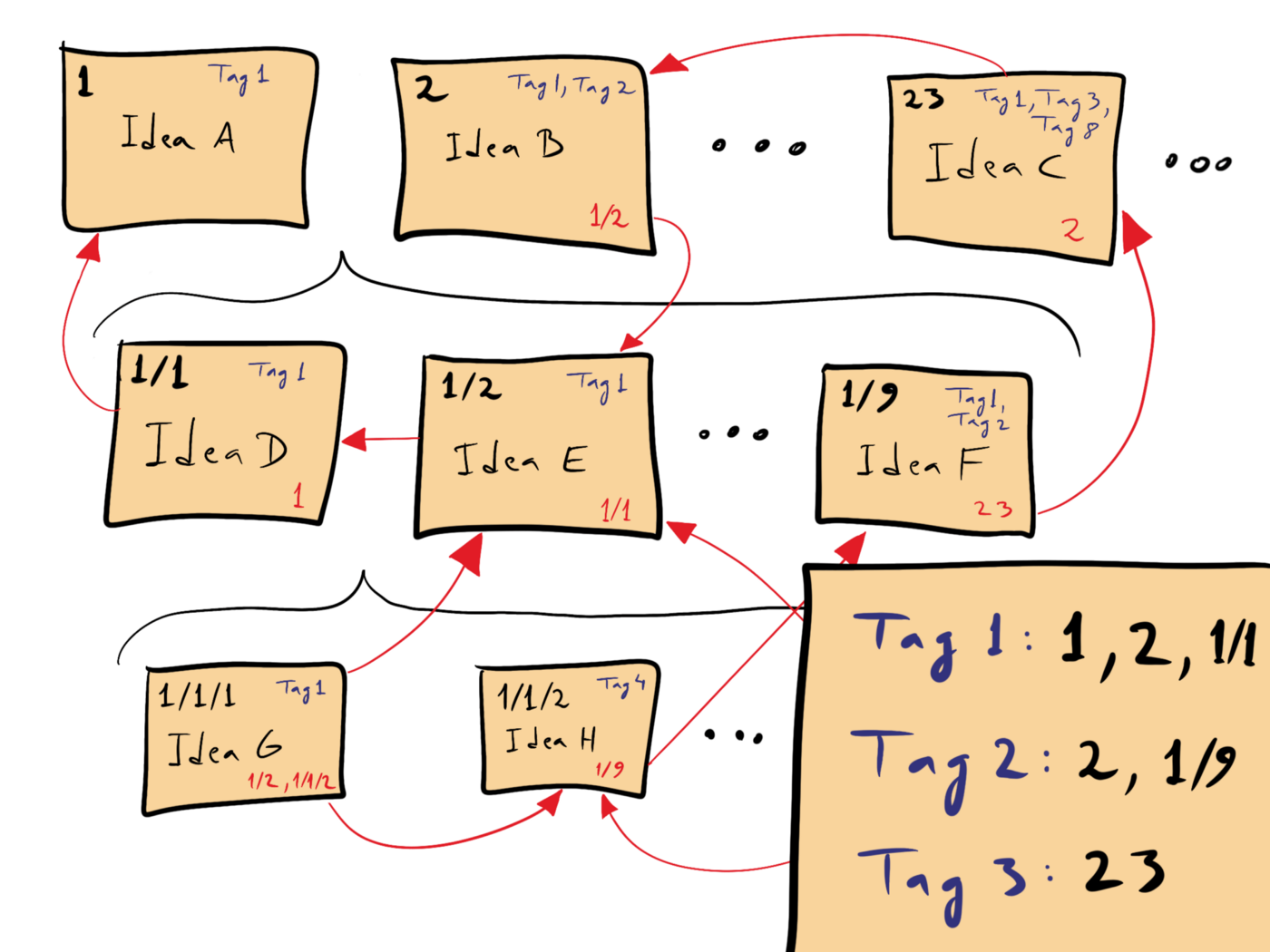
In the diagram each card is an idea. In the upper left-hand corner of each card is it’s unique identifier (1,2,3, etc…). The lower right-hand corner references other note cards. Tags identify the themes.
Seems a bit tedious because we live in the modern world of hyperlinks and wiki pages. So let’s fast-forward to today.
Markdown and Tooling
In modern times we can accomplish the same kind of organization and structure using hyperlinks. The markdown format makes life even easier by providing shortcuts to link to other documents.
I prefer local solutions over 3rd party hosted solutions simply for portability. Being an engineer as well I wanted as little context-switching as possible. I started with a VSCode plugin called Foam. Foam allowed me to stay within VSCode and use markdown. For a few years it worked well. I began running into performance issues as my vault grew. Using foam within VSCode along with all my other developer extensions became slow.
I decided to move to Obsidian as my Zettelkasten tool. Obsidian is a simple markdown and file organizer and grows complexity and functionality via it’s extension framework (More on that in a different blog post). Obsidian provides easy navigation between notes using tags and links. It also allows traversing the knowledge graph visually, which is handy when dealing with a large topic that organically grows.
Structuring My Zettelkasten
I love Zettelkasten because it allows me to organize how I see fit. My structure works for me. I don’t need to prescribe to philosophy or ideology.
I have switched approaches at least twice, taking a few years to be happy and productive in my structure. I thought I’d share it with you in hopes of sparking ideas for you.
The root of my vault contains:
|- personal                -- Notes for my personal life,
|                             reading backlog, home improvement
|                             ideas, etc...
|- professionalgrowth      -- Collection of feedback and growth
|                             areas across my jobs
|- <company>               -- Stores all my notes for the
|                             given company. I have a dedicated
|                             folder per company
README.md                  -- A dashboard of quicklinks that
                              describes the structure of my
                              vault.
My root structure isn’t crazy. Let me show you my <company> folder structure:
<comapny>
 |
 |- clients                -- Notes and meeting minutes for each of
 |                            our customers
 |- competitors            -- Notes on our competitors
 |
 |- hiring                 -- Overview of our hiring process, job role
 |                            definitions, and interview segment definition
 |- people                 -- 1+1 notes for each person I meet with
 |
 |- projects               -- Project overviews, status, and meeting meeting
 |
 |- teams                  -- Overview of the various teams and groups within
 |                            the company and how they relate to each other
 |- tools                  -- Tools and vendor contact
 |
 |- weekly                 -- Weekly TODO lists
 <company>.md              -- Company overview, mission, vision, strategy,
                              structure, process quick links
I’m not attempting to reproduce existing documentation so I link off to company resources as much as possible. But many times I find that I need to convert a thought, proposal, approach into my own words to fully understand the concept.
I find these high level groupings helpful. It allows me to link people to teams and projects, or reference a specific TODO to a client conversation.
When I started I was a bit too granular with my structure which created a lot of confusion. I was mixing projects with teams and product lines. I created the mental model that everything is a project, that includes people. teams are a loose grouping of people. A team may be a group of engineers working on project, or it might be our C-suite.
What I’ve Learned
I’ve had to accept there is no single best way to organize all my thoughts. What I need is something flexible enough for me to change. Zettelkasten has given me a way to loosely organize the information in my head, and to change when it makes sense.
BAPO
Decomposing a high-level strategy is hard. Immediately we want to know “When is it going to be done?” and “How much is going to cost? (In effort, time, and/or actual $$$)” It’s a fair question to ask because in tight times we want to make sure we aren’t wasting effort (and $$$). We spend days and weeks debating who to move to which team and calculating budgets requests to increase staffing. We document the product requirements and create designs. We build against the requirements and designs. In our perfect world this waterfall of idea to execution flows flawlessly.
In reality issues arise which cause teams to pivot, change timelines, and change priorities. The technical solution is more complicated than we assumed, stakeholders expected different deliverables than what the team built, stakeholders push to change scope, etc.. all cause issues. As the project drags on stakeholders begin to lose faith, engineering struggles with the technology, and product teams have to massage an imperfect solution into the expected use case. Then someone asks the dreaded question, “Why did we do this in the first place?”
So how did we end up in this situation where we had a great idea but failed to meet our expectations? How did we lose faith in the idea, in the technology, or in the team? How could we have avoided being so mis-aligned?
We started with the wrong question. We jumped right into answering staffing and cost questions without aligning on the business impact of the strategy. We assigned people without understanding what we are building and thus who should be included. We didn’t establish a process for delivering iterative value back to the stakeholders.
A person smarter than me introduced me to the BAPO framework. BAPO is a framework which describes the order in which you should make decisions when tackling a strategic direction. It postulates that organization is the LAST decision that a company should make. Decisions need to start with understanding and aligning on the business impact, define the architecture to be built and the process to execute, then finally how to organize. Only once the business impact, architecture, and process are understood can you determine the right organization to build to support it.
The basics of BAPO:
- B usiness Impact - Is the impact of the strategy well understood and agreed upon? Are leaders aligned on the direction at the highest level and believe the direction is the most impactful.
- A rchitecture - Is the technical architecture of the solution defined?
- P rocess - Do we know how we are going to deliver? Are milestones defined and agreed upon from both the stakeholders and the delivery team?
- O rganization - What is the right team structure and composition to put in place? Is more than one team needed?
When teams run into issues I often assess their issues against the pillars of BAPO. For instance, if engineers aren’t clear on what to build next I look for architecture/tech designs to exist. If the milestones aren’t agreed upon between stakeholders and the delivery I will push to align and clarify the business impact. Having BAPO as a frame of reference helps me articulate what is necessary for a strategy to be successful.
The BAPO framework forces me to ask “Why?” so that I can gain clarity to make informed decisions. I find it a useful tool which helps re-orient conversations. It helps teams avoid “cart-before-the-horse” scenarios and drives more logical decision making.
Computerjargon.com Archives
I purchased the Computerjargon.com domain name back in 1998, shortly after I started my first job as a “web programmer”. I was working for a now-defunct company called Moore Data Management Systems in Minneapolis. The internet boom was just starting to take off and I was trying to ride it’s wave.
I had been developing web pages and perl scripts since 1993. I remember updating HTML to be compliant with Netscape 1.0 in high school. I worked as a contractor converting Word docs to HTML while I was in college. Moore Data was my first professional job. My job was to create HTML templates which rendered real estate data from their custom SQL server. Computerjargon.com was going to be my sanctuary from the monotony of the corporate world.
Computerjargon.com was many things over the next decade but I mostly settled on using it as my personal blog. As friends joined the internet community I used Computerjargon.com to be my personal internet hub, linking off to their respective corners of the web. I shared personal stories of growing up and becoming parents on Computerjargon.com. I used my blog to say whatever I needed to sway
With the rise of Facebook and Twitter my personal blog became passé. I used Facebook to share any personal stories and had no need for Computerjargon.com. I used Twitter to talk about technology. Eventually I retired Computerjargon.com and redirected it to Jason.Motylinski.com.
I’ve long given up Facebook and Twitter, realizing that shouting into an echo chamber doesn’t bring a lot of satisfaction. I’ve decided to restart blogging but this time for myself.
I’ve kept a lot of data and documents over the years, but the content from 1998 - 2010s of Computerjargon.com seemed to have slipped by me. I was upset that so much of my life had been lost.
I decided to try the Wayback Machine in hopes that it had caught some of Computerjargon.com’s history. To my surprise the Wayback Machine had lots of my former blog content. It had captured the first page I published in 1999 all the way thru the site going stale in 2010.
I wrote a quick script to download my content from Wayback Machine to preserve it and published the Computerjargon.com Archives online for posterity’s sake. The archive contains snapshots from 1999 thru 2010. Much of the content is very cringe-worthy but I like to peruse it from time to time. The archives contain so many forgotten memories.
Book Review: Shape Up
I recently read Shape Up based on the recommendation of peers at work looking to iterate on their product development life cycle. Like many companies we follow scrum loosely. Scrum works well once an initiative moves into delivery but we struggle with the upfront discovery, definition, and design phases. Historically we have done annual planning, spending countless months to create outcomes, debate initiatives, and adjust the organizational structure only to realize 2 months in to the new year we need to pivot. Shape Up is a process which allows teams to quickly discover, define, develop and pivot.
37Signals has made the book freely available online. Below are some of thoughts on some of it’s topics.
Time as a Constraint
The biggest change Shape Up proposes is using time as a constraint. Shape Up introduces the concept of a “Cycle”, which is a time box of 6 weeks. Shape Up correctly calls out a major pain point of scrum - a 2 week sprint just too short to accomplish meaningful when developing a product.
Shaping the Pitch
The cycle is meant to be heads down delivery which means much of the discovery and definition of the problem needs to be completed before hand. Shape Up spends much of the time outlining a process referred to as “The Pitch”. It is a method for product teams to form a hypothesis, present a proposal, and for the organization to bet on it for the next 6 weeks. The solution to the pitch must fit within a cycle otherwise the problem is too big.
The process of fitting a pitch into the timespan is consider the “shaping” process. In the shaping process the team is refining scope, throwing out any unnecessary work, and refining the approach so that the goal can be achieved within the cycle. Compromises will be made which is all part of the process.
Multiple pitches will be made by multiple teams for the upcoming cycle. The Pitch process gives the teams a chance to prioritize which pitches to bet on for the next cycle. There’s a variety of factors which may make a pitch approved or rejected. The important change is the conversation and alignment which happen or the various pitches. When a cycle starts everyone should know which objectives they are targeting and why those objectives were picked.
Cool down
Teams often struggle to balance new development with support and tech debt. Shape Up acknowledges that support and tech debt needs to be worked on by creating a 2-week period between cycles in which engineering teams can focus on paying down some of the tech debt while the pitch process is wrapping up.
Overall Impression
I liked that Shape Up can easily plug into an existing scrum process. The book covers delivery but I can’t say it shared anything revolutionary within the phase. The pitch process nicely drops right in front of teams using scrum for delivery. I can see how a pitch could easily map to epics and flow right into a standard scrum process. I also think focusing on output at the end of a cycle removes a lot of the stress teams feel to demonstrate meaningful process every 2-weeks. Teams can think bigger and solve larger issues with the increased bandwidth.
We are just wrapping up our first pitch process and are about to go into delivery with our first cycle. We hope Shape Up will help us break down our large, long-term goals into achievable milestones that provide incremental functionality along the way.
Paralysis
I get stuck in starting on the most basic tasks. This blog is a prime example. I have so many lists in so many different tools of topics that have been rattling around in my head for years. When my daughter gets stuck in her own analysis paralysis I tell her to just start, take a first step, just do.
I’m going to take my own advice. Here’s a nonsensical, non-prioritized, non-complete, brain dump of topics that will blog about at some point:
- How to start a new job
- Waiting / validating opinions
- Imposter syndrome
- feedback
- how to start anything
- setting and measuring expectations
- how to build consensus
- It’s ok to not be a tech firm
- How much time does it take to be a manager?
- Zettelkasten
- Korn Ferry
- Personal and professional reading list
- BAPO
- Projects
- Rawk it
- Home Assistant
- Raffl.online
- joels.photography
- computerjargon.com
- Architecture of jason.motylinski.com
- Books reviews
- Shape up
- Three Body Problem
- The Creative Act
- The Alliance
Hello
Hello there. Let’s get a few basics out of the way:
Name: Jason Motylinski
Profession: Software Engineering
Years of experience: 25
Current Role: VP, Engineering
Previous Roles: Way too many to list. Started as an engineer, moved into leadership and people management about 12 years ago.
Technologies: I’ve been all around the tech stack: backend, frontend, and APIs. I’ve been in the cloud and on-prem. I have built solutions from scratch and I have contributed to mature platforms. My current passion lies in data and AI-powered solutions.
Personal: Partner, 2 kids, 3 dogs. Currently reside just outside of New York City in the New Jersey suburbs.
So why am I deciding to blog now? Somewhere along the way my experience has become helpful to others. I want to share my passion for technology, leadership, and business outside of the day-to-day, where I can take a step back from execution and focus on the principles of engineering and leadership.
You are the lucky one that stumbled across my corner of the internet. I hope you find my ramblings at the least entertaining and at the most helpful.